

محولات Dyness
مهم
مهم
حاليًا، التكامل يدعم حتى حد شحن بنسبة 95%. وذلك لأنه عند تجاوز حالة الشحن 95%، قد يتوقف البطارية عن الاستجابة لنقاط الضبط بسبب إجراءات نظام إدارة البطارية.
نحن نعمل على حل هذه المشكلة مع Dyness وشركاء آخرين.
الأجهزة المدعومة
| Device Type | Variants | Modbus TCP (Ethernet) | RS485 | Curtailment |
|---|---|---|---|---|
| EC100 | 100kWh | ✅ | ✅ | ✅ |
| DH100F | 71~100kWh | |||
| DH200F | 100kW/215kWh | |||
| DH200Y | 100kW/232kWh | ❌ |
الأسلاك
يتواصل Sofar EMS مع محولات Dyness عبر RS485 أو إيثرنت.
إيثرنت
للتوصيل الصحيح بكابل الإيثرنت: اتبع إرشادات توصيل الإيثرنت.
RS485
معلومات
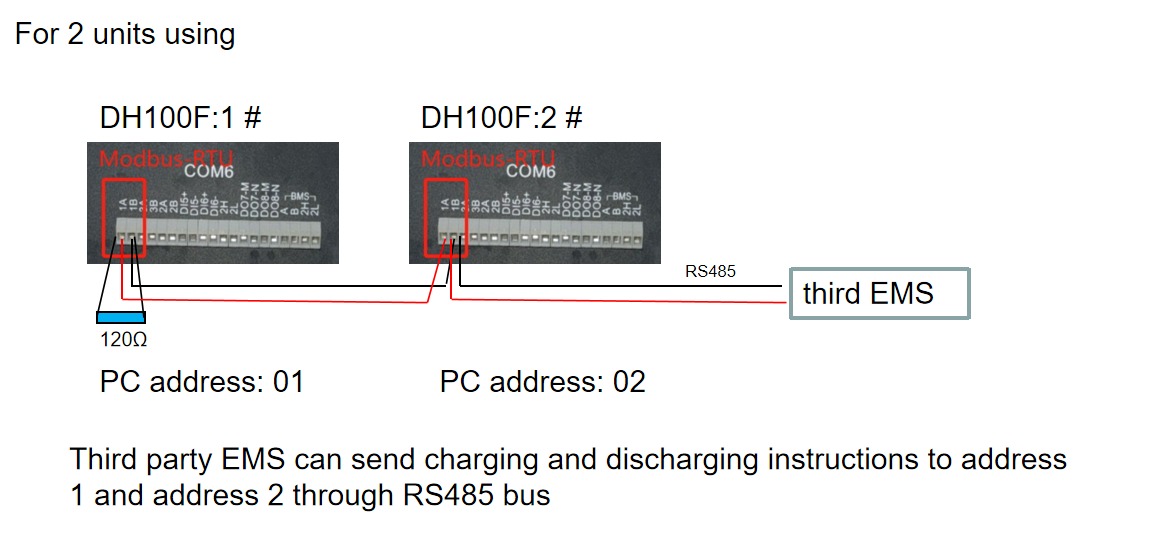
RS485 Wiring
- For correct RS485 wiring: Follow the guidelines for RS485 wiring.
- If the wiring shown in the table below is incorrect, please let us know.
- There is no general consensus in the industry about the usage of A and B for the RS485 polarity, so it may be counterintuitive and opposite of what you might expect for some devices.
| Device | Sofar EMS model OM1 | Sofar EMS model IG8 | RS485-USB converter | RS485-Ethernet converter |
|---|---|---|---|---|
| COM6 terminal 1A | RS485 A | RS485_POS | RS485 A | TX+ |
| Com6 terminal 1B | RS485 B | RS485_NEG | RS485 B | TX- |
| N/A | RS GND | GND | Not available | G |
الإعداد
DH100F
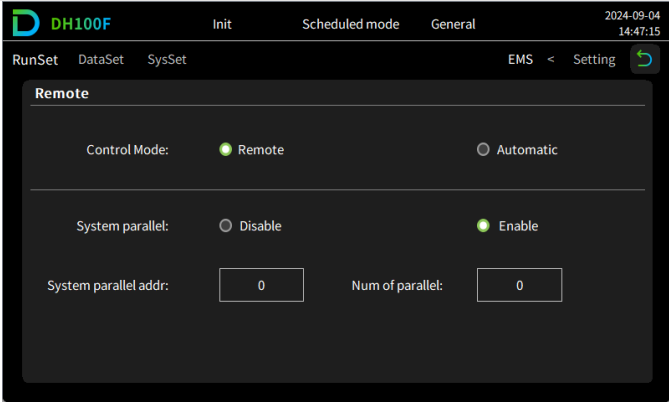
تحتاج محولات Dyness DH100F إلى الضبط على وضع التحكم عن بُعد:
- انقر على أيقونة القائمة الرئيسية في الزاوية العلوية اليمنى من الواجهة الرئيسية
- انقر على "البيانات" في شريط القائمة الرئيسي
- انقر على "EMS" في شريط القائمة الفرعي
- انقر على "RunSet" في أعلى يسار شريط التنقل
- اضبط وضع التحكم إلى "عن بُعد"
تحذير
NOTE: RS485 Device Addresses
- You MUST give each device on the RS485 bus a unique address. Check the manual of the device on how to do this.
- Use lower addresses first (1, 2, ...) because the Sofar EMS will find them faster!
- For each device, it is generally recommended to stick with the factory default baud rate, parity, and stop bits. The Sofar EMS will scan on those first.
Last updated February 18, 2026Edit this page