
BMR Energimätare

Stödda enheter
| Device Type | Modbus TCP (Ethernet) | RS485 |
|---|---|---|
| PLA33 | ✅ | ✅ |
| PLA33RX |

Figur 1: Frontpanelen på PLA33 med knappar som SET, piltangenter och ESC.
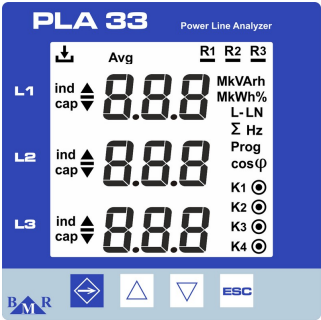
Figur 2: Frontpanelen på PLA33RX med knappar som ESC, piltangenter och status-LED för inspelning och reläutgångar.
Kabeldragning
RS485
För RS485-kabeldragning, följ riktlinjerna för RS485-kabeldragning.
Info
RS485 Wiring
- For correct RS485 wiring: Follow the guidelines for RS485 wiring.
- If the wiring shown in the table below is incorrect, please let us know.
- There is no general consensus in the industry about the usage of A and B for the RS485 polarity, so it may be counterintuitive and opposite of what you might expect for some devices.
| Device | Sofar EMS model OM1 | Sofar EMS model IG8 | RS485-USB converter | RS485-Ethernet converter |
|---|---|---|---|---|
| A | RS485 A | RS485_POS | RS485 A | TX+ |
| B | RS485 B | RS485_NEG | RS485 B | TX- |
| GND | RS GND | GND | Not available | G |
Varning
NOTE: RS485 Device Addresses
- You MUST give each device on the RS485 bus a unique address. Check the manual of the device on how to do this.
- Use lower addresses first (1, 2, ...) because the Sofar EMS will find them faster!
- For each device, it is generally recommended to stick with the factory default baud rate, parity, and stop bits. The Sofar EMS will scan on those first.
Ethernet
För Ethernet-kabeldragning, följ riktlinjerna för Ethernet-kabeldragning.
Konfiguration
RS485 Konfiguration
För att konfigurera RS485-kommunikation på BMR elmätare, följ dessa steg:
-
Ställ in Modbus-adressen:
- Gå till inställningsmenyn genom att trycka på SET-knappen i 5 sekunder.
- Navigera till kommunikationsmenyn (
P_2) med hjälp av piltangenterna. - Ställ in Id (unik Modbus-adress) mellan 1 och 247.
-
Ställ in Baud Rate:
- I kommunikationsmenyn (
P_2), konfigurera bd (baud rate) för att matcha ditt system. Stödda baud rates inkluderar9.6 / 19.2 / 38.4 / 57.6 / 115 kBd.
- I kommunikationsmenyn (
-
Paritet och stopbitar:
- Konfigurera PAr (paritet) som
None,OddellerEven. - Ställ in St (stopbitar) till
1eller2efter behov.
- Konfigurera PAr (paritet) som
-
RS485 Terminering:
- Om mätaren är den sista enheten på RS485-bussen, lägg till ett 120 Ω termineringsmotstånd.
Varning
NOTE: RS485 Device Addresses
- You MUST give each device on the RS485 bus a unique address. Check the manual of the device on how to do this.
- Use lower addresses first (1, 2, ...) because the Sofar EMS will find them faster!
- For each device, it is generally recommended to stick with the factory default baud rate, parity, and stop bits. The Sofar EMS will scan on those first.
Ethernet-konfiguration (Endast PLA33RX)
För enheter med Ethernet-funktionalitet:
- Säkerställ att Ethernet-kabeln är korrekt ansluten.
- Använd Power Monitoring Software (PMS) för att konfigurera IP-adress, nätmask och gateway.
- Kontrollera att Modbus TCP-porten är inställd på 502.
Last updated February 18, 2026Edit this page