

Inversores Marstek
Dispositivos compatibles
Nota
Compatibilidad de dispositivos Por favor, actualice su inversor a la última versión de firmware para habilitar modbusTCP, esto es compatible a partir de la versión v144.
| Device Type | Variants | Modbus TCP (Ethernet) | RS485 | Curtailment |
|---|---|---|---|---|
| Venus-C | 2.5kWh | ✅ | ✅ | ❌ |
| Venus-E | 5.1kWh |
Nota
Compatibilidad de dispositivos Esta integración fue probada con el dispositivo Venus C. Sin embargo, otros dispositivos que usan el mismo protocolo de comunicación, como Venus E, también pueden ser compatibles. Si dispone de un dispositivo así, es probable que funcione, pero estamos a la espera de confirmación oficial del fabricante.
Para la configuración del dispositivo, por favor siga la guía: Guía oficial Marstek
Cableado
El Sofar EMS y los inversores Marstek se comunican vía RS485. A partir de la versión V3 de Marstek, hay soporte nativo de Modbus TCP que puede usarse para conectar directamente mediante el cable LAN.
RS485
El puerto RS485 se encuentra en el siguiente diagrama y el cableado depende de la versión del dispositivo.
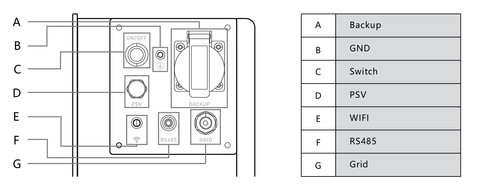
Los cables A y B son diferentes para V2 y V3. A continuación puede ver la conexión para V2.
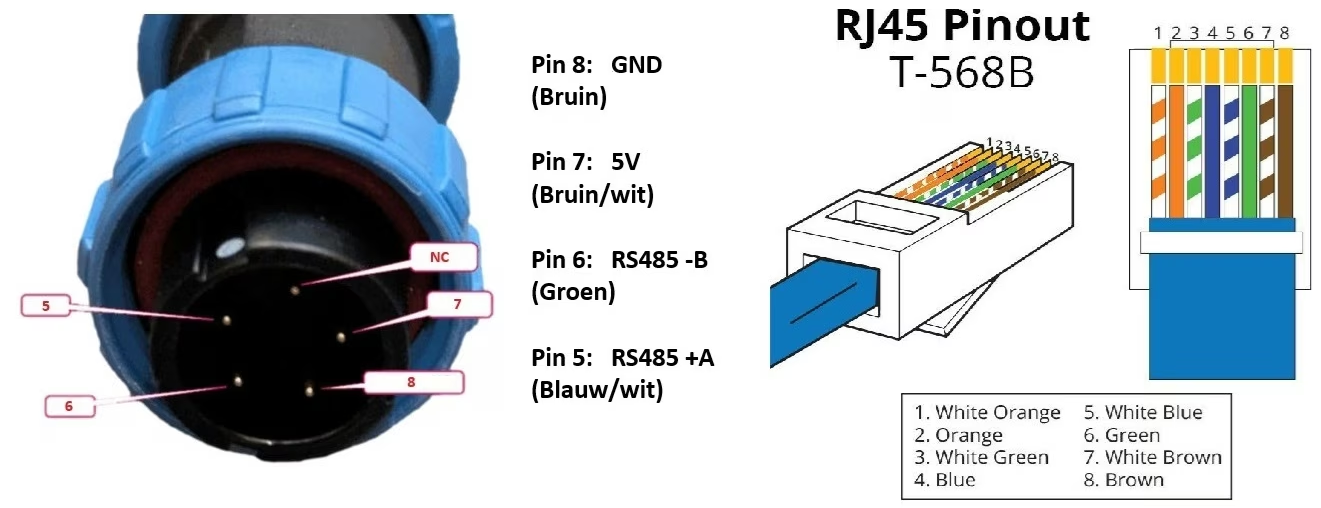
Para V3, los cables 1 y 2 representan B y A respectivamente, mientras que los cables 4-5 van a VCC y 7-8 a GND. Una vez conectado, el cable quedará así:
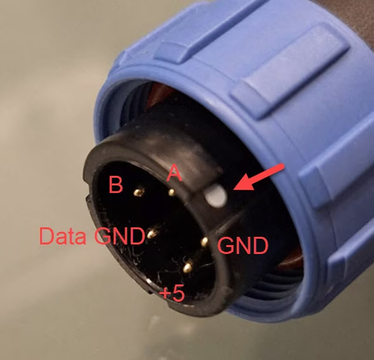
RS485 Wiring
- For correct RS485 wiring: Follow the guidelines for RS485 wiring.
- If the wiring shown in the table below is incorrect, please let us know.
- There is no general consensus in the industry about the usage of A and B for the RS485 polarity, so it may be counterintuitive and opposite of what you might expect for some devices.
| Device | Sofar EMS model OM1 | Sofar EMS model IG8 | RS485-USB converter | RS485-Ethernet converter |
|---|---|---|---|---|
| A | RS485 A | RS485_POS | RS485 A | TX+ |
| B | RS485 B | RS485_NEG | RS485 B | TX- |
| GND | RS GND | GND | Not available | G |
NOTE: RS485 Device Addresses
- You MUST give each device on the RS485 bus a unique address. Check the manual of the device on how to do this.
- Use lower addresses first (1, 2, ...) because the Sofar EMS will find them faster!
- For each device, it is generally recommended to stick with the factory default baud rate, parity, and stop bits. The Sofar EMS will scan on those first.