
Contatori di Energia BMR

Dispositivi Supportati
| Device Type | Modbus TCP (Ethernet) | RS485 |
|---|---|---|
| PLA33 | ✅ | ✅ |
| PLA33RX |
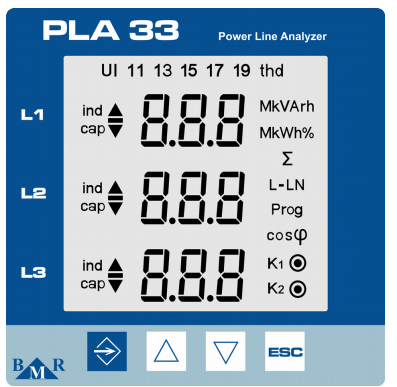
Figura 1: Pannello frontale del PLA33 che mostra pulsanti come SET, tasti cursore e ESC.
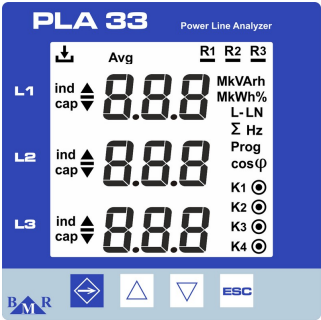
Figura 2: Pannello frontale del PLA33RX che mostra pulsanti come ESC, tasti cursore e LED di stato per registrazione e uscite relè.
Cablaggio
RS485
Per il cablaggio RS485, segui le linee guida per il cablaggio RS485.
Info
RS485 Wiring
- For correct RS485 wiring: Follow the guidelines for RS485 wiring.
- If the wiring shown in the table below is incorrect, please let us know.
- There is no general consensus in the industry about the usage of A and B for the RS485 polarity, so it may be counterintuitive and opposite of what you might expect for some devices.
| Device | Sofar EMS model OM1 | Sofar EMS model IG8 | RS485-USB converter | RS485-Ethernet converter |
|---|---|---|---|---|
| A | RS485 A | RS485_POS | RS485 A | TX+ |
| B | RS485 B | RS485_NEG | RS485 B | TX- |
| GND | RS GND | GND | Not available | G |
Avviso
NOTE: RS485 Device Addresses
- You MUST give each device on the RS485 bus a unique address. Check the manual of the device on how to do this.
- Use lower addresses first (1, 2, ...) because the Sofar EMS will find them faster!
- For each device, it is generally recommended to stick with the factory default baud rate, parity, and stop bits. The Sofar EMS will scan on those first.
Ethernet
Per il cablaggio Ethernet, segui le .
Configurazione
Configurazione RS485
Per configurare la comunicazione RS485 sui contatori di energia BMR, segui questi passaggi:
-
Impostare l'Indirizzo Modbus:
- Accedi al menu delle impostazioni premendo il pulsante SET per 5 secondi.
- Naviga al menu comunicazioni (
P_2) usando i tasti cursore. - Imposta l'Id (indirizzo Modbus univoco) tra 1 e 247.
-
Impostare il Baud Rate:
- Nel menu comunicazioni (
P_2), configura il bd (baud rate) in base al tuo sistema. I baud rate supportati includono9.6 / 19.2 / 38.4 / 57.6 / 115 kBd.
- Nel menu comunicazioni (
-
Parità e Bit di Stop:
- Configura PAr (parità) come
None,Odd, oEven. - Imposta il St (bit di stop) su
1o2secondo necessità.
- Configura PAr (parità) come
-
Terminazione RS485:
- Se il contatore è l'ultimo dispositivo sul bus RS485, aggiungi una resistenza di terminazione da 120 Ω.
Avviso
NOTE: RS485 Device Addresses
- You MUST give each device on the RS485 bus a unique address. Check the manual of the device on how to do this.
- Use lower addresses first (1, 2, ...) because the Sofar EMS will find them faster!
- For each device, it is generally recommended to stick with the factory default baud rate, parity, and stop bits. The Sofar EMS will scan on those first.
Configurazione Ethernet (Solo PLA33RX)
Per i dispositivi con capacità Ethernet:
- Assicurati che il cavo Ethernet sia collegato correttamente.
- Usa il Power Monitoring Software (PMS) per configurare indirizzo IP, subnet mask e gateway.
- Verifica che la porta Modbus TCP sia impostata su 502.