
Dyness Växelriktare
Viktigt
Viktigt
För närvarande stödjer integrationen en laddningsnivå upp till 95%. Detta beror på att när laddningsnivån överstiger 95% kan batteriet sluta lyssna på styrsignaler på grund av batterihanteringssystemets åtgärder. Vi arbetar med att lösa detta problem tillsammans med Dyness och andra partners.
Stödda enheter
| Device Type | Variants | Modbus TCP (Ethernet) | RS485 | Curtailment |
|---|---|---|---|---|
| EC100 | 100kWh | ✅ | ✅ | ✅ |
| DH100F | 71~100kWh | |||
| DH200F | 100kW/215kWh | |||
| DH200Y | 100kW/232kWh | ❌ |
Kabeldragning
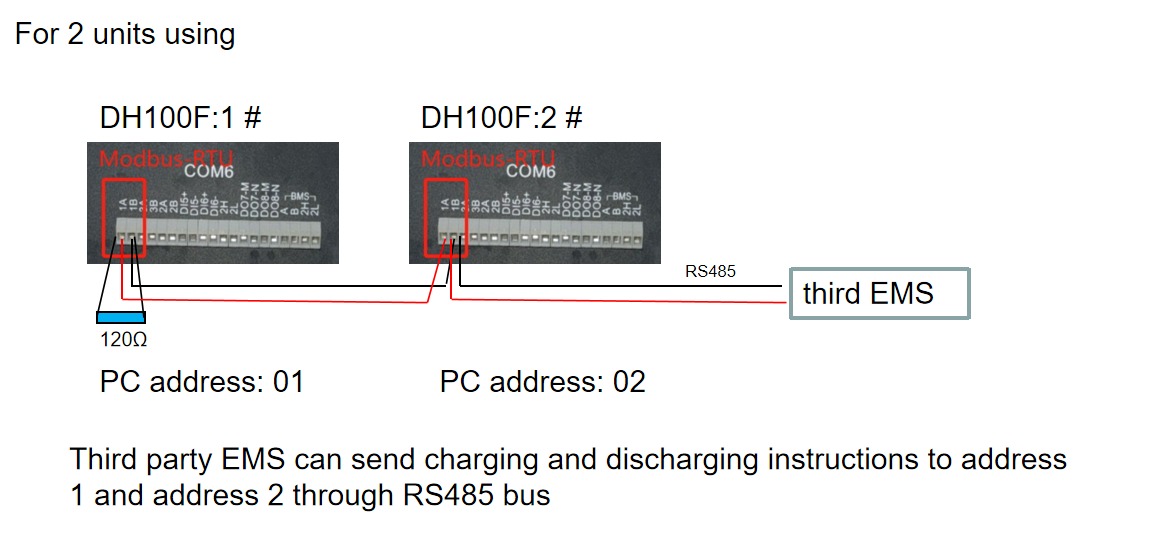
Sofar EMS och Dyness-växelriktarna kommunicerar via RS485 eller Ethernet.
Ethernet
För korrekt ethernet-kabeldragning: Följ riktlinjerna för ethernet-kabeldragning.
RS485
Info
RS485 Wiring
- For correct RS485 wiring: Follow the guidelines for RS485 wiring.
- If the wiring shown in the table below is incorrect, please let us know.
- There is no general consensus in the industry about the usage of A and B for the RS485 polarity, so it may be counterintuitive and opposite of what you might expect for some devices.
| Device | Sofar EMS model OM1 | Sofar EMS model IG8 | RS485-USB converter | RS485-Ethernet converter |
|---|---|---|---|---|
| COM6 terminal 1A | RS485 A | RS485_POS | RS485 A | TX+ |
| Com6 terminal 1B | RS485 B | RS485_NEG | RS485 B | TX- |
| N/A | RS GND | GND | Not available | G |
Konfiguration
DH100F
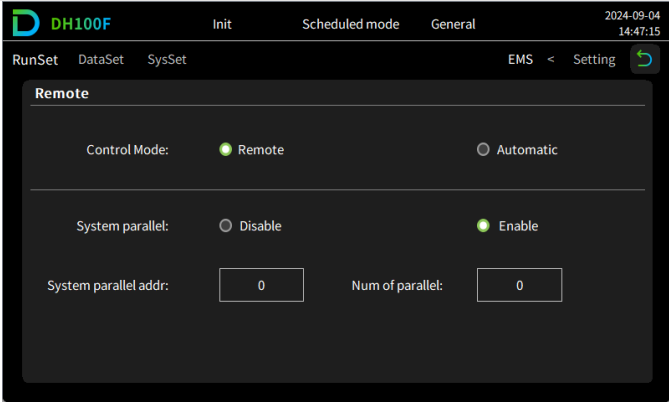
Dyness DH100F måste ställas in på fjärrläge:
- Klicka på huvudmenyikonen längst upp till höger i huvudgränssnittet
- Klicka på "Data" i huvudmenyraden
- Klicka på "EMS" i undermenyn
- Klicka på "RunSet" längst upp till vänster i navigeringsfältet
- Ställ in Kontrollläge till "Remote"
Varning
NOTE: RS485 Device Addresses
- You MUST give each device on the RS485 bus a unique address. Check the manual of the device on how to do this.
- Use lower addresses first (1, 2, ...) because the Sofar EMS will find them faster!
- For each device, it is generally recommended to stick with the factory default baud rate, parity, and stop bits. The Sofar EMS will scan on those first.
Last updated February 18, 2026Edit this page