

Marstek Växelriktare
Stödda enheter
Not
Enhetskompatibilitet Uppdatera din växelriktare till den senaste firmware-versionen för att aktivera modbusTCP, detta stöds från och med v144.
| Device Type | Variants | Modbus TCP (Ethernet) | RS485 | Curtailment |
|---|---|---|---|---|
| Venus-C | 2.5kWh | ✅ | ✅ | ❌ |
| Venus-E | 5.1kWh |
Not
Enhetskompatibilitet Denna integration har testats med Venus C-enhet. Andra enheter som använder samma kommunikationsprotokoll, såsom Venus E, kan också vara kompatibla. Om du har en sådan enhet är det troligt att den fungerar, men vi inväntar officiell bekräftelse från tillverkaren.
För konfiguration av enheten, vänligen följ guiden: Marstek officiell guide
Kablar
Sofar EMS och Marstek-växelriktarna kommunicerar via RS485. Från och med version V3 av Marstek finns inbyggt stöd för Modbus TCP som kan användas för direkt anslutning via LAN-kabel.
RS485
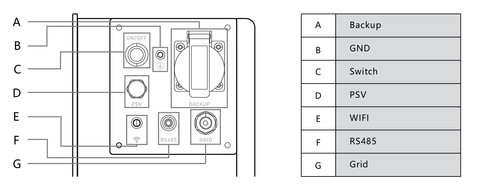
RS485-porten finns i följande diagram och kabeldragningen beror på versionen av enheten.
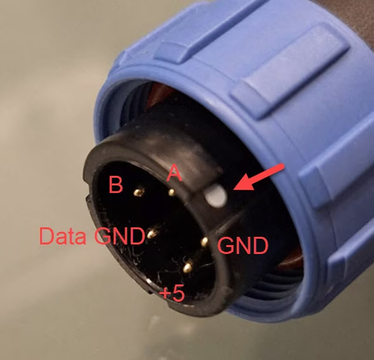
Kabel A och B skiljer sig för V2 och V3. Nedan kan du se anslutningen för V2.
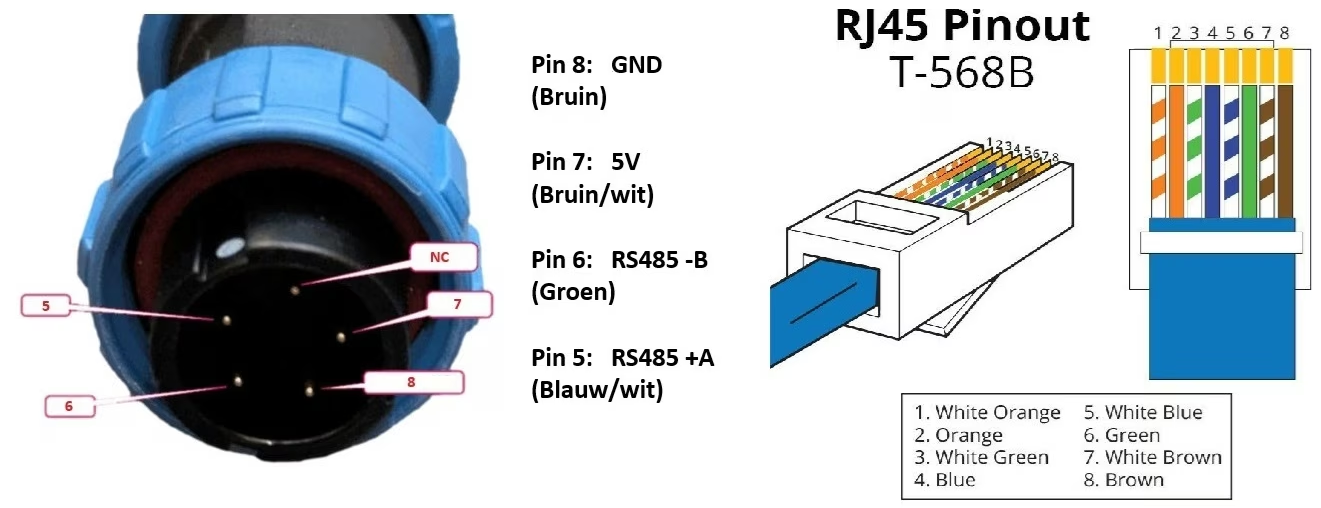
För V3 representerar kablarna 1 och 2 B respektive A, medan kablar 4-5 är kopplade till VCC och 7-8 till GND. När ansluten kommer kabeln att vara som följer:
RS485 Wiring
- For correct RS485 wiring: Follow the guidelines for RS485 wiring.
- If the wiring shown in the table below is incorrect, please let us know.
- There is no general consensus in the industry about the usage of A and B for the RS485 polarity, so it may be counterintuitive and opposite of what you might expect for some devices.
| Device | Sofar EMS model OM1 | Sofar EMS model IG8 | RS485-USB converter | RS485-Ethernet converter |
|---|---|---|---|---|
| A | RS485 A | RS485_POS | RS485 A | TX+ |
| B | RS485 B | RS485_NEG | RS485 B | TX- |
| GND | RS GND | GND | Not available | G |
NOTE: RS485 Device Addresses
- You MUST give each device on the RS485 bus a unique address. Check the manual of the device on how to do this.
- Use lower addresses first (1, 2, ...) because the Sofar EMS will find them faster!
- For each device, it is generally recommended to stick with the factory default baud rate, parity, and stop bits. The Sofar EMS will scan on those first.