

Fortona 48TL200 Batterisystem
Understøttede Enheder
| Device Type | Variants | Modbus TCP (Ethernet) | RS485 | Curtailment |
|---|---|---|---|---|
| Fortona 48TL200 (FZSoNick) | 48TL200 | ❌ | ✅ | ❌ |
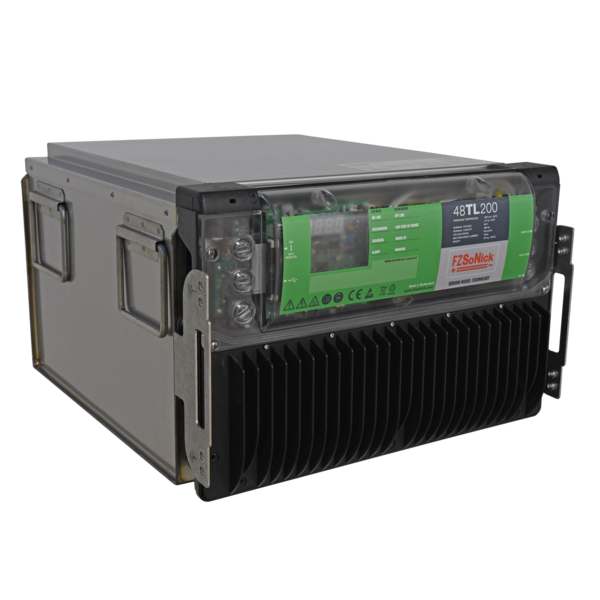
Kabelføring
The Sofar EMS kommunikerer med Fortona 48TL200 batterisystemet via RS485 (Modbus RTU).
Tilslut RS485-ledningerne til RJ45-kommunikationsportene på frontpanelet af batteriet.
Info
RS485 Wiring
- For correct RS485 wiring: Follow the guidelines for RS485 wiring.
- If the wiring shown in the table below is incorrect, please let us know.
- There is no general consensus in the industry about the usage of A and B for the RS485 polarity, so it may be counterintuitive and opposite of what you might expect for some devices.
| Device | Sofar EMS model OM1 | Sofar EMS model IG8 | RS485-USB converter | RS485-Ethernet converter |
|---|---|---|---|---|
| RS485 D+ | RS485 A | RS485_POS | RS485 A | TX+ |
| RS485 D– | RS485 B | RS485_NEG | RS485 B | TX- |
| GND | RS GND | GND | Not available | G |
Advarsel
NOTE: RS485 Device Addresses
- You MUST give each device on the RS485 bus a unique address. Check the manual of the device on how to do this.
- Use lower addresses first (1, 2, ...) because the Sofar EMS will find them faster!
- For each device, it is generally recommended to stick with the factory default baud rate, parity, and stop bits. The Sofar EMS will scan on those first.
Konfiguration
1. Tjek RS485 Kabelføring
- Sørg for, at RS485 D+, RS485 D– og GND linjerne er korrekt forbundet.
- Brug snoet par-kabel egnet til RS485-kommunikation.
- Hvis flere enheder er tilsluttet samme bus, terminer da den sidste enhed i henhold til RS485 bedste praksis.
- Bekræft, at alle enheder bruger samme kommunikationsparametre.
Tip
Tip
Kommunikationsparametre
- Protokol: Modbus RTU
- Baudrate: 115200
- Parity: Odd eller Even
- Stop bits: 1
- Modbus adresseområde: 1–247 (hver enhed skal have en unik ID)
2. Konfigurer Sofar EMS
I Sofar EMS interfacet:
- Tilføj en ny RS485 enhed.
- Vælg “Fortona 48TL200 Battery Modbus Protocol”.
- Indtast de samme RS485-parametre som ovenfor:
- Baudrate: 115200
- Paritet: Odd (eller Even, afhængig af systemet)
- Stop bits: 1
- Sæt den korrekte Modbus adresse for batteriet.
- Gem og anvend konfigurationen.
Advarsel
Advarsel
Hvert Fortona 48TL200 batteri skal have en unik Modbus slave ID.
Undgå dublerede ID’er på samme RS485-linje.
3. Tænd for Strømmen og Bekræft
- Påfør 54–60 VDC til batterisystemet.
- Tænd for hovedafbryderen.
- BMS initialiserer — begge LED’er på frontpanelet vil blinke under opstart.
- Når systemet er i drift, lyser begge LED’er fast.
- Sofar EMS skulle nu automatisk opdage og læse data fra batteriet.
Tip
Tip
Batteriet starter automatisk opladning, hvis State of Charge (SOC) er under 100%.