
Medidores de Energía BMR

Dispositivos Compatibles
| Device Type | Modbus TCP (Ethernet) | RS485 |
|---|---|---|
| PLA33 | ✅ | ✅ |
| PLA33RX |
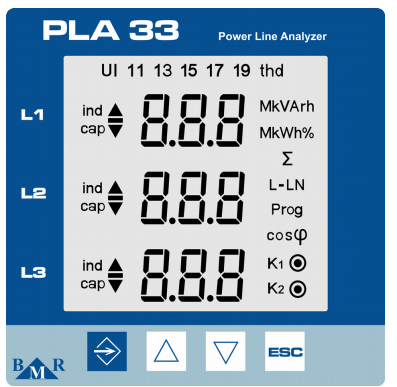
Figura 1: Panel frontal del PLA33 mostrando botones como SET, teclas cursor y ESC.
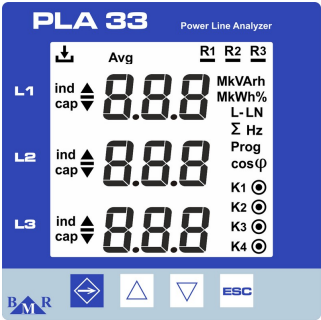
Figura 2: Panel frontal del PLA33RX mostrando botones como ESC, teclas cursor y luces LED de estado para grabación y salidas de relé.
Cableado
RS485
Para el cableado RS485, siga las directrices para el cableado RS485.
Info
RS485 Wiring
- For correct RS485 wiring: Follow the guidelines for RS485 wiring.
- If the wiring shown in the table below is incorrect, please let us know.
- There is no general consensus in the industry about the usage of A and B for the RS485 polarity, so it may be counterintuitive and opposite of what you might expect for some devices.
| Device | Sofar EMS model OM1 | Sofar EMS model IG8 | RS485-USB converter | RS485-Ethernet converter |
|---|---|---|---|---|
| A | RS485 A | RS485_POS | RS485 A | TX+ |
| B | RS485 B | RS485_NEG | RS485 B | TX- |
| GND | RS GND | GND | Not available | G |
Advertencia
NOTE: RS485 Device Addresses
- You MUST give each device on the RS485 bus a unique address. Check the manual of the device on how to do this.
- Use lower addresses first (1, 2, ...) because the Sofar EMS will find them faster!
- For each device, it is generally recommended to stick with the factory default baud rate, parity, and stop bits. The Sofar EMS will scan on those first.
Ethernet
Para el cableado Ethernet, siga las directrices para el cableado Ethernet.
Configuración
Configuración RS485
Para configurar la comunicación RS485 en los medidores de energía BMR, siga estos pasos:
-
Configurar la Dirección Modbus:
- Acceda al menú de configuración presionando el botón SET por 5 segundos.
- Navegue al menú de comunicación (
P_2) usando las teclas cursor. - Ajuste el Id (dirección Modbus única) entre 1 y 247.
-
Configurar la Velocidad en Baudios:
- En el menú de comunicación (
P_2), configure el bd (velocidad en baudios) para que coincida con su sistema. Las velocidades soportadas incluyen9.6 / 19.2 / 38.4 / 57.6 / 115 kBd.
- En el menú de comunicación (
-
Paridad y Bits de Parada:
- Configure PAr (paridad) como
None,Odd, oEven. - Ajuste los St (bits de parada) a
1o2según sea necesario.
- Configure PAr (paridad) como
-
Terminación RS485:
- Si el medidor es el último dispositivo en el bus RS485, añada una resistencia de terminación de 120 Ω.
Advertencia
NOTE: RS485 Device Addresses
- You MUST give each device on the RS485 bus a unique address. Check the manual of the device on how to do this.
- Use lower addresses first (1, 2, ...) because the Sofar EMS will find them faster!
- For each device, it is generally recommended to stick with the factory default baud rate, parity, and stop bits. The Sofar EMS will scan on those first.
Configuración Ethernet (Solo PLA33RX)
Para dispositivos con capacidad Ethernet:
- Asegúrese de que el cable Ethernet esté correctamente conectado.
- Utilice el Software de Monitoreo de Energía (PMS) para configurar la dirección IP, máscara de subred y puerta de enlace.
- Verifique que el puerto Modbus TCP esté configurado en 502.