

Marstek Omvormers
Ondersteunde Apparaten
Opmerking
Apparaatcompatibiliteit Werk uw omvormer bij naar de nieuwste firmwareversie om modbusTCP in te schakelen; dit wordt ondersteund vanaf v144.
| Device Type | Variants | Modbus TCP (Ethernet) | RS485 | Curtailment |
|---|---|---|---|---|
| Venus-C | 2.5kWh | ✅ | ✅ | ❌ |
| Venus-E | 5.1kWh |
Opmerking
Apparaatcompatibiliteit Deze integratie is getest met het Venus C apparaat. Andere apparaten die hetzelfde communicatieprotocol gebruiken, zoals Venus E, kunnen mogelijk ook compatibel zijn. Als u zo'n apparaat heeft, is de kans groot dat het werkt, maar we wachten nog op officiële bevestiging van de fabrikant.
Voor de configuratie van het apparaat, volgt u de handleiding: Officiële handleiding Marstek
Bekabeling
De Sofar EMS en de Marstek omvormers communiceren via RS485. Vanaf de V3 versie van Marstek is er native Modbus TCP-ondersteuning die kan worden gebruikt om via de LAN-kabel direct verbinding te maken.
RS485
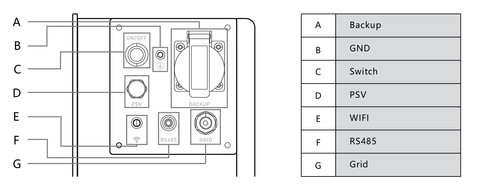
De RS485-poort is te vinden in het volgende diagram en de bekabeling hangt af van de versie van het apparaat.
De A- en B-kabels zijn verschillend voor V2 en V3. Hieronder ziet u de aansluiting voor V2.
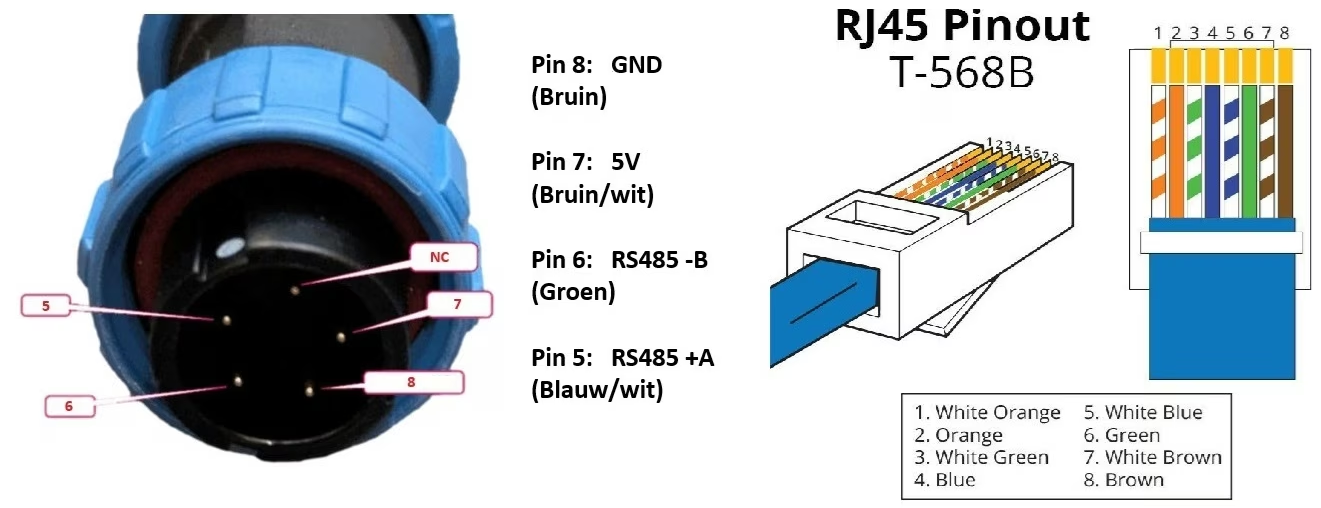
Voor V3 vertegenwoordigen de kabels 1 en 2 respectievelijk B en A, terwijl kabels 4-5 verbinden met VCC en 7-8 met GND. Eenmaal aangesloten, zal de kabel er als volgt uitzien:
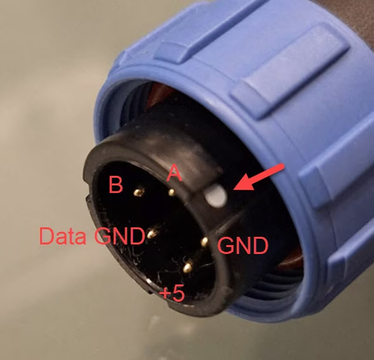
RS485 Wiring
- For correct RS485 wiring: Follow the guidelines for RS485 wiring.
- If the wiring shown in the table below is incorrect, please let us know.
- There is no general consensus in the industry about the usage of A and B for the RS485 polarity, so it may be counterintuitive and opposite of what you might expect for some devices.
| Device | Sofar EMS model OM1 | Sofar EMS model IG8 | RS485-USB converter | RS485-Ethernet converter |
|---|---|---|---|---|
| A | RS485 A | RS485_POS | RS485 A | TX+ |
| B | RS485 B | RS485_NEG | RS485 B | TX- |
| GND | RS GND | GND | Not available | G |
NOTE: RS485 Device Addresses
- You MUST give each device on the RS485 bus a unique address. Check the manual of the device on how to do this.
- Use lower addresses first (1, 2, ...) because the Sofar EMS will find them faster!
- For each device, it is generally recommended to stick with the factory default baud rate, parity, and stop bits. The Sofar EMS will scan on those first.